


Compare used Canon DSLR cameras by image quality
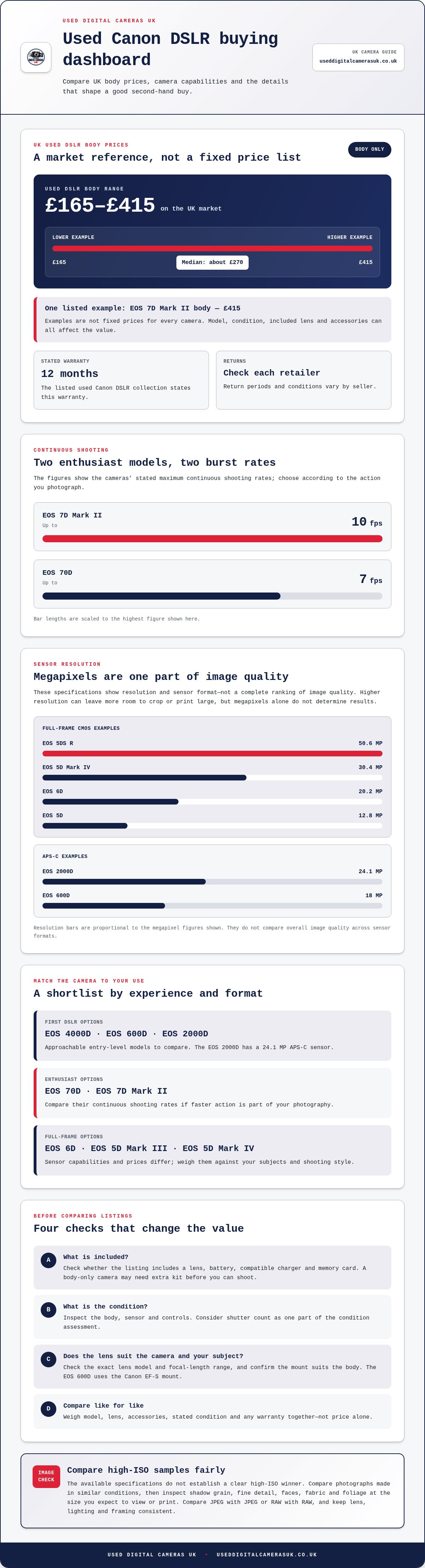
The best used Canon DSLR is the one whose sensor, image quality and condition suit the way you shoot, not simply the model with the biggest number. For example, the Canon EOS 5D Mark IV has a 30.4 MP full-frame sensor, while the EOS 600D has an 18 MP APS-C sensor. If you’re looking to buy a second-hand Canon DSLR in the UK, compare what each body can deliver with what’s included and its condition.
It’s sensible to weigh image quality against your budget and intended use. A higher-resolution sensor can give you more room to crop or print large, while an APS-C body can suit everyday photography. The model name alone won’t tell you whether a particular camera is the right buy.
This guide explains how to compare Canon DSLR image quality, UK market prices, included lenses and accessories, and the checks that help assess a pre-owned body. Use it to shortlist cameras and identify which details matter most before buying.
Key Takeaways
- Use the UK market range of £165 to £415 for used DSLR bodies as a reference point, then compare like-for-like models and what each listing includes.
- Compare sensor size and resolution against the photos you want to take; more megapixels alone don’t determine image quality.
- Check whether the price covers a lens, battery, charger and memory card, as a body-only camera may need extra kit before you can shoot.
- Inspect the body, sensor and controls, and consider the shutter count as one part of assessing a camera’s condition.
- Shortlist by how you’ll use the camera, then weigh image quality, condition and included accessories together before choosing.
Used Canon DSLR options and UK prices
Used Canon DSLR bodies range from entry-level to enthusiast and full-frame models, with prices varying by model and condition. Compare the body, included equipment and any stated warranty together, rather than choosing on price alone.
Models for beginners and enthusiasts
For a first DSLR, the Canon EOS 4000D and EOS 600D are approachable options to compare. The EOS 2000D offers another entry-level option, with a 24.1 MP APS-C sensor.
Enthusiasts may prefer models with features suited to faster or more demanding photography. The EOS 70D shoots continuously at up to 7fps, while the EOS 7D Mark II reaches 10fps. For full-frame photography, compare the EOS 6D, EOS 5D Mark III and EOS 5D Mark IV. Their prices and sensor capabilities differ, so match the body to your subjects and shooting style.
What are the best used Canon DSLR models for beginners and enthusiasts? Beginners can compare the EOS 4000D, EOS 600D and EOS 2000D, whilst enthusiasts may shortlist the EOS 70D, 7D Mark II or a full-frame EOS 5D. Choose by intended use, included lens and the camera’s condition.
UK used-camera pricing
On the UK market, used DSLR bodies typically cost between £165 and £415, with a median of about £270. Individual examples show how much model and configuration matter:
- A used EOS 7D Mark II body was listed for £415.
These listings are market examples, not fixed prices for every camera. A body-only listing differs from a kit with a lens, and condition can affect value too. Compare like for like: model, lens, accessories and stated condition. A lower price may mean budgeting separately for equipment you need to start shooting.
What warranty and returns do UK retailers offer on used Canon cameras? The listed used Canon DSLR collection states a 12 months warranty. Return terms vary by retailer, so read the seller’s policy for the return period and any conditions before purchase.
Image quality and high-ISO performance
Compare sensor size, resolution and your intended shooting conditions together. A higher megapixel count gives more pixels, but doesn’t automatically mean cleaner images in dim light. The Canon EOS 5D Mark IV has a 30.4 MP full-frame sensor; the EOS 600D has an 18 MP APS-C sensor. Those specifications describe different formats and resolutions, not a complete ranking of image quality.
Sensor size, resolution and detail
Full-frame models such as the EOS 5D and EOS 6D are worth comparing if you want that sensor format. The EOS 5D has a 12.8 MP full-frame CMOS sensor, while the EOS 6D has a 20.2 MP full-frame CMOS sensor. For detailed landscapes or crops, the EOS 5DS R offers 50.6 MP on a full-frame CMOS sensor. Consider how large you print and how much you crop, rather than treating resolution as the only measure.
APS-C models can still produce useful detail for everyday photography. The EOS 2000D has a 24.1 MP APS-C sensor, compared with the EOS 600D’s 18 MP APS-C sensor. Match sensor format and resolution to your subjects, output size and lens. A sharp photograph also depends on focus, exposure and technique, so a sensor specification cannot tell the whole story.
Assessing high-ISO results
High ISO settings help a camera record images in low light, but can make image noise more visible. Results depend on the camera, exposure and processing. The available specifications don’t establish a clear high-ISO winner among these Canon models. Compare photographs made in similar conditions instead of relying on model names or megapixel counts.
Use this practical comparison when reviewing sample images from an EOS 6D, EOS 5D Mark IV or EOS 2000D:
- Compare photographs of the same subject in similar light, with similar exposure and framing.
- Look at shadow areas and plain surfaces for visible grain or loss of fine detail.
- Check faces, fabric and foliage at the size you expect to view or print them.
- Compare JPEG images with RAW files only like for like, since editing can change noise and detail.
For a hands-on check, photograph a familiar indoor scene using the camera’s standard settings, then review the file on a larger screen. Keep the lens, lighting and framing consistent when comparing two bodies. This helps you distinguish differences in exposure or focus from the camera’s rendering.
Choose the Canon body whose image files suit your actual subjects, not simply the highest resolution. Comparing used Canon DSLR cameras by sensor format and sample-image detail can help narrow your shortlist.
Included lenses and accessories
A Canon DSLR listing may be for a body only, a single-lens kit or a bundle with extra equipment. Compare the full contents before weighing two offers: a lens, battery or charger affects how quickly you can start shooting. Check which items are included in the sale and which appear only for illustration.
Check which lens comes with the body
That package differs from a body-only listing, so consider whether both lenses suit your photography. A standard zoom can cover everyday scenes, while a longer zoom can help frame distant subjects. Check the exact lens model and focal-length range rather than relying on the word “kit”.
These serve different purposes: the zoom covers a range of framing choices, whilst the macro lens is designed for close-up work. Confirm the lens mount suits the camera body. The EOS 600D, for example, uses the Canon EF-S mount.
Other listings show how broad the lens market can be. Treat these as examples, not universal prices. Lens condition, included caps and accessories, and the exact model all matter when comparing listings.
Account for essential accessories
Before buying, make a checklist of what you need to use the camera. A battery and compatible charger are practical essentials, and a memory card lets you save photographs. Check that each item appears in the listing’s contents instead of assuming it comes with the body or lens. For a bundle, note how many batteries are included and whether a charger is supplied.
- Match the lens mount and model to the Canon body.
- Check for front and rear lens caps, and a body cap.
- Confirm the battery, charger and memory card are included.
- Compare bundle contents against the lenses you would otherwise buy separately.
A clear inventory helps you avoid paying for duplicate equipment or overlooking something needed for your first outing. When choosing between a body-only camera and a bundle, compare the total cost of the components you need. A longer lens is useful only if its focal range suits your subjects; two lenses are not automatically better than one well-matched option.
Inspection and reconditioning
A careful inspection helps distinguish cosmetic wear from faults that affect photographs or operation. Check the Canon body, lens mount, controls, battery compartment and sensor, then test the camera with a memory card. The condition description matters, but practical checks give you a clearer picture of the individual camera.
What are the risks of buying a used Canon DSLR privately in the UK? The camera could have undisclosed faults, missing accessories or a condition that differs from its description. You may also have less reassurance from a retailer’s stated warranty and returns terms, so inspect the item and agree the sale details before paying.
Inspect the body and test its functions
Start by examining the Canon DSLR’s exterior. Look for dents, cracks, loose panels, corrosion around the battery compartment and damage near the tripod socket. Worn rubber grips are often cosmetic, but a damaged mount or sticky control can affect use. Check that the battery door closes securely and that the buttons respond.
Fit a compatible lens and take photographs at different settings. Review the images for spots that remain in the same position, which may indicate dust or marks on the sensor. Test autofocus, manual focus, flash, card access and the rear screen. Taking a short burst can reveal intermittent shutter or control problems that a single test shot might miss.
Use shutter count as one condition clue
Shutter count helps describe use, but it cannot establish the camera’s full condition on its own. Market listings include an EOS 70D with 1,197 shutter actuations, an EOS 5D Mark III with 12,950, and an EOS 5D Mark II with 71,531. Compare count alongside the body’s wear, function and the seller’s condition description. A low count does not prove every component works correctly.
When assessing reconditioning, focus on what has actually been tested or cleaned rather than treating the word as a guarantee of condition. A thorough inspection should cover the sensor, shutter, autofocus, screen, buttons and card slot. If you can’t handle the camera in person, request sample photographs and compare their detail and exposure with the listing description.
Reduce listing and payment risks
How can you avoid scams and counterfeit listings when buying a used camera in the UK? Compare the model name, body markings and serial number across the listing photographs and camera details. Use clear, original photographs, test the camera before payment where possible, and keep the written description and payment record.
- Match the model name on the camera with the listing, such as EOS 70D or EOS 5D Mark III.
- Check that the lens mount, battery and charger match the described kit.
- Test the controls and review photographs before completing an in-person purchase.
- Keep the seller’s description, agreed contents and payment confirmation.
These checks help you compare a private listing with a retailer’s stated testing, warranty and returns terms. Judge each Canon DSLR on its own evidence: clear condition details, working functions and images made with that specific body.
Pre-owned Canon DSLR bodies
A body-only Canon DSLR listing lets you choose a lens separately, but the model still needs to suit your photography. Compare its intended use, condition, included battery and charger, and the cost of any lens you’ll need. The examples below show how varied the used-body market can be, from straightforward entry-level options to specialist models.
Compare bodies by role, not age alone
For a first DSLR, the EOS 1200D, EOS 2000D, EOS 550D and EOS 700D are useful models to shortlist. Compare the controls and handling that matter to you, then check whether your preferred lens is compatible. A low-cost body is only a practical choice if it works with the kit you plan to use.
Enthusiasts can widen the comparison to the EOS 77D, EOS 90D and EOS 5Ds R. These figures show a wide range, not a simple quality ranking. Consider the camera’s role in your photography, the condition of the specific unit and whether its features justify the extra spend for your needs.
Read body-only listings carefully
“Body only” means the listing price does not include a lens. Check the full contents before comparing it with a kit listing. Confirm that a battery and charger are included, and account for a compatible lens if you don’t already own one. A Canon DSLR body may seem cheaper at first, but the useful comparison is the total equipment needed to take photographs.
Look beyond the model name. Those examples illustrate why intended use matters: a specialist body may not suit everyday photography. Set your priorities first, then compare relevant bodies rather than assuming the highest price means the best match.
Use a simple shortlist before deciding:
- Choose the type of photography you want the body to handle.
- Compare like-for-like listings, including condition and included equipment.
- Check the lens mount and the lenses available for your intended use.
- Balance the body’s price against any essential kit you still need.
For a pre-owned Canon DSLR, the strongest choice is the body that fits your subjects, budget and existing lenses. Explore pre-owned Canon camera options to compare bodies and find a model suited to your photography.
Used Digital Cameras UK: Used Sony Digital Cameras
Used Digital Cameras UK is a natural next step for comparing pre-owned Canon DSLR bodies with other camera options. Its range includes Used Canon Digital Cameras, alongside Used Sony Digital Cameras, Used Nikon Digital Cameras and Used Fujifilm Digital Cameras.
Each camera is tested and comes with a battery, charger and memory card, helping you see what’s included before choosing. Free UK shipping is also included. Compare the available camera’s condition, specifications and supplied accessories against the photography you have in mind. If you’re set on a Canon DSLR, focus your shortlist on the body and lens combination that suits your subjects and budget. If you’re still weighing systems, comparing the other camera brands can help clarify your priorities.
Explore the camera options at useddigitalcamerasuk.co.uk and contact Used Digital Cameras UK for help choosing.
Choose a camera that fits your next project
Before deciding, picture the photographs you want to take next: family moments, wildlife, travel or creative projects. That practical reference point can help you prioritise handling and lens choice over specifications that may not matter for your photography. If you plan to buy a second-hand Canon DSLR in the UK, let those subjects guide your shortlist.
Still comparing? As you decide whether to buy a second-hand Canon DSLR in the UK, focus on the camera you’ll enjoy using for the photographs you want to make, not simply the model that looks impressive on paper. Used Digital Cameras UK also offers Used Sony Digital Cameras, Used Nikon Digital Cameras and Used Fujifilm Digital Cameras if you’re weighing up different systems. Contact Used Digital Cameras UK to take your next step with confidence.
Frequently Asked Questions
How to choose the best used DSLR?
Choose a body that suits your subjects, lenses and usual way of shooting. Start by naming your main use, such as portraits, wildlife or travel, then identify the lens range and handling that would support it. Decide which feature matters most before comparing models. For example, a wildlife photographer may prioritise reach, while someone taking portraits may care more about lens choice and comfortable handling.
What are typical UK prices for used Canon DSLR bodies and kits?
Used Canon DSLR body listings range from older, lower-cost models to more recent enthusiast and full-frame bodies. Kits with lenses can cost more than body-only listings, depending on the lens and contents. Treat these as examples, then compare the same model and package type.
What should I check when buying a second-hand Canon DSLR in person?
Bring a compatible memory card and lens, then take several test photographs. Check the viewfinder for clear visibility, the screen for display problems, and the hot shoe and connection ports for visible damage. Review images at full size, including dark areas and fine details. Confirm that the serial number and model marking match the listing, and that every agreed accessory is present before completing the purchase.
How can I check a used Canon DSLR's shutter count and condition?
Ask for a recent shutter-count reading or an original image file that can be checked with a compatible shutter-count tool. Not every model provides the count through its menus, so the method depends on the camera. Treat the result as one clue, not a complete condition report. Compare it with visible wear, test the shutter in different shooting modes, and review several files for consistent exposure and focus.