


SD card compatibility for retro cameras: choose the right card
The biggest card isn’t automatically the right one. SD card compatibility for retro cameras depends first on whether the camera accepts standard SD or SDHC: standard SD cards hold up to 2GB, while SDHC cards range from 4GB to 32GB and need a compatible camera. Older models may also use a different card format altogether.
It’s easy to assume that any card that fits the slot will work, only to find the camera can’t recognise it. The camera’s age and exact card format matter more than capacity alone, and a microSD card with an adapter won’t solve a format mismatch.
This guide explains how to identify the camera’s slot and check its capacity limit to find a suitable card. You’ll also learn when an SD adapter is useful and how much speed a retro camera needs, so you can choose a card that suits the camera without paying for specifications it can’t use.
Key Takeaways
- Start with the camera’s card slot and supported format; age can offer a clue, but the model’s requirements are what matter.
- Standard SD cards hold up to 2GB, while SDHC cards range from 4GB to 32GB and need a compatible camera.
- A microSD-to-SD adapter changes the card’s physical fit, not the camera’s format or capacity limits.
- Some retro cameras use other formats, such as CompactFlash, Memory Stick or xD-Picture Card, so an SD card won’t suit every model.
- Match card speed to the camera’s use, and format the card in the camera for which it’s intended.
SDHC card capacity and compatibility
Card compatibility depends on the camera’s supported format and maximum capacity. SD, SDHC and SDXC cards may look similar, but their standards and file systems differ.
Capacity limits across card formats
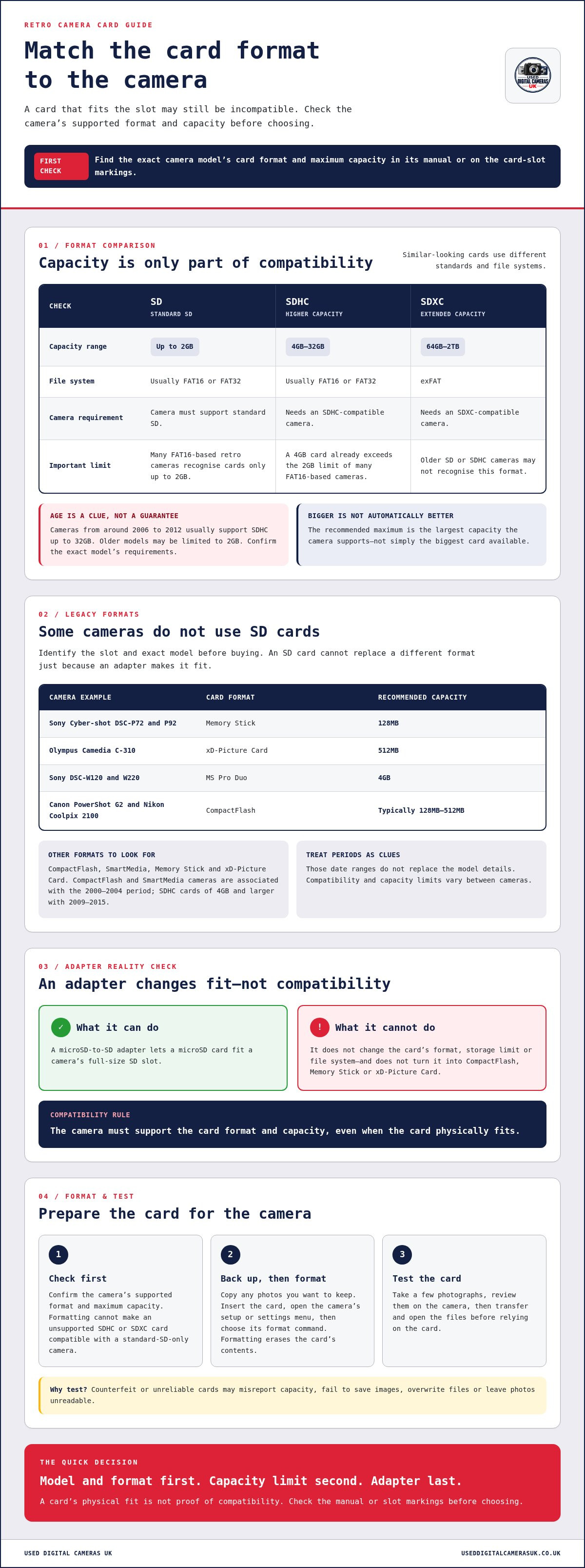
SD, SDHC and SDXC are distinct card formats with different capacity ranges. Standard SD cards hold up to 2GB; SDHC cards range from 4GB to 32GB. SDXC cards start at 64GB and reach a maximum capacity of 2TB. These limits matter because a camera built for standard SD may not recognise SDHC or SDXC, even when the card fits its slot.
Check the camera’s manual for its supported format and maximum capacity. A capacity above that limit can cause recognition problems. SD and SDHC usually use FAT16 or FAT32, whilst SDXC uses exFAT. That file-system difference is another reason a camera designed for an older card standard may reject a newer format.
FAT16 and the 2GB limit
FAT16 is a file system used by many retro digital cameras, and those cameras can recognise cards up to 2GB. That limit matters when choosing between standard SD and SDHC: a 4GB SDHC card is already beyond the capacity many FAT16-based cameras support.
A camera’s age offers a clue, not a substitute for its model specifications. Cameras from around 2006 to 2012 usually support SDHC cards up to 32GB, whilst older models can be limited to 2GB. Partitioning an SDHC or SDXC card doesn’t change its format or make an unsupported standard compatible.
Recommended maximum card capacities
The recommended maximum is the largest capacity the camera supports, not simply the biggest card available. For a standard SD camera, stay within 2GB; for an SDHC-compatible model, the format reaches 32GB. This distinction helps prevent buying a card that the camera cannot recognise or use fully.
Check the exact camera model’s manual or card-slot markings before choosing. A camera from around 2006 to 2012 may accept SDHC, but its supported capacity still determines the suitable card. SDXC cards of 64GB or more suit only cameras that support SDXC, rather than older SD or SDHC models.
In-camera formatting and card errors
To format a card, insert it, open the camera’s setup or settings menu, and select the format command. Copy any photos you want to keep first, because formatting erases the card’s contents. Formatting in the camera prepares the card for that device and can help avoid corruption.
If an older camera displays a card error, use its menu to format the card in-camera. First, make sure the card’s format and capacity match the camera’s supported standard. Formatting cannot make an incompatible SDHC or SDXC card work in a camera limited to standard SD and 2GB.
Legacy camera card compatibility
Legacy cameras may use SD, CompactFlash, SmartMedia, Memory Stick or xD-Picture Card. Identify the exact model and card format before choosing a replacement.
Counterfeit or unreliable cards can misreport their capacity, fail to save images or leave files unreadable. Test a card with a few photographs before relying on it for an important shoot.
Checking support for legacy cameras
Legacy camera compatibility depends on the format named for that model, not just the card’s physical fit. Check the camera manual or inspect its slot before choosing a card. CompactFlash and SmartMedia cameras are associated with the 2000-2004 period, whilst SDHC cards of 4GB and larger are associated with 2009-2015.
Those periods are useful clues, not a substitute for model details. Some legacy cameras support standard SD cards, but compatibility and capacity limits vary by model. A camera requiring CompactFlash, SmartMedia or another format cannot use an SD card simply because an adapter makes it fit.
Risks from counterfeit or unreliable cards
A counterfeit or unreliable card may claim a capacity it cannot reliably store. The camera might appear to save photographs, then overwrite files or produce images that cannot be opened. This is a particular risk with older cameras, where recovering pictures from a failing card can be difficult.
Buy a card from a dependable source and test it in the camera before a planned shoot. Take a few photographs, review them on the camera, then transfer and open the files. This test can reveal writing or reading problems before you rely on the card.
Older cameras can also use formats that are now less familiar. The Sony Cyber-shot DSC-P72 and P92 use Memory Stick, with 128MB as the recommended maximum capacity. The Olympus Camedia C-310 uses xD-Picture Card, with a recommended maximum of 512MB. These examples show why a camera’s model number and format matter more than choosing the largest card.
Some models accept a different legacy format and capacity. The Sony DSC-W120 and W220 use MS Pro Duo cards, with a recommended maximum of 4GB. The Canon PowerShot G2 and Nikon Coolpix 2100 use CompactFlash, typically with capacities between 128MB and 512MB. These are not interchangeable card types, so identify the camera’s exact slot before buying.
If you get a card error, first check that the card meets the camera’s format and capacity requirements. Then format it using the camera’s own menu. This prepares the card for the device and may resolve errors caused by formatting elsewhere. Back up valuable images before formatting, because the process erases the card’s contents.
MicroSD cards with SD adapters
A microSD-to-SD adapter lets a microSD card fit a camera’s full-size SD slot. It doesn’t convert the card into CompactFlash, Memory Stick or xD-Picture Card. Cameras designed for those formats need the matching card type, not a standard SD adapter. Compatibility depends on the slot and the camera’s supported format.
A listed example is a 32GB microSD card supplied with an SD adapter. That combination can suit an SD camera only if the camera accepts its card format and capacity. The adapter changes the card’s physical size, not its storage limit or file system. So a camera’s maximum supported capacity still matters.
Check the camera manual for SD or SDHC support before using a microSD adapter. A camera limited to standard SD may not recognise a 32GB card, even though the adapter fits. If the camera supports SDHC, the card’s capacity and format may be suitable. Fit alone is not proof that the camera can read it.
For most still photography and basic HD video, Class 10 or U1 is recommended. These labels describe speed classes, not compatibility with every camera. A retro model may not use the card’s full speed, and a fast rating cannot overcome an unsupported capacity or format. Match the card to both the camera’s requirements and your use.
Before shooting, place the microSD card in its adapter, then insert it into the camera’s SD slot. After saving any images you want to keep, format the card in the camera’s menu. Take a test photograph and review it on the camera. Then transfer and open the file to confirm it saved correctly.
If the camera shows a card error, check that the adapter is seated, the card format is supported and its capacity is within the camera’s limit. Formatting in-camera may resolve an error, but it cannot make an incompatible card work. A microSD-to-SD adapter also cannot turn SDHC into standard SD.
For cameras that use CompactFlash, Memory Stick or xD-Picture Card, a standard SD adapter is the wrong type. Each camera needs a supported card format; a microSD-to-SD adapter only presents a microSD card in an SD-sized format. An adapter for another format would need to match the camera’s slot and compatibility requirements. Check the model manual before choosing.
Keep the adapter and microSD card together after use. Handle the small card carefully to avoid misplacing it, and store both in a case to protect the contacts from dirt. For a camera that accepts SD, an adapter can be a compact option. For a camera built around another card format, choose a matching card instead.
Older digital camera compatibility
Age helps narrow the search, but the camera model determines its card requirements. Check the model number, memory-card slot and manual before ordering. A camera released in 2008 may use SD, whilst another older model may require CompactFlash or a different format. The slot’s shape alone can be misleading if an adapter is involved.
Canon’s DSLR range offers a useful example of changing support. The EOS 450D introduced SD cards to that range in 2008 and is compatible with SD cards. The EOS 60D began using SD cards in 2010. These dates show why release year can guide your search, but they don’t establish support for every camera from the same period.
Use this model-first check before selecting a card:
- Find the exact model name. Read the label on the camera body, such as “EOS 450D”, rather than relying on the brand alone.
- Identify the card format. Check the manual or slot for SD, CompactFlash, Memory Stick or another named type.
- Match capacity to the model. Confirm the maximum capacity and card standard in that camera’s specifications.
- Format in the camera. After inserting a suitable card, use the camera’s menu before taking photographs.
- Test the result. Capture and review an image, then transfer it and open the file.
This process matters because card families aren’t interchangeable. A CompactFlash camera won’t accept a standard SD card directly. An SD adapter only changes physical fit where that adapter is designed for the camera’s slot. It doesn’t make every card format compatible or remove the camera’s capacity limit.
For older models, the manual’s memory-card section is more useful than a general rule based on age. Check the supported card family, capacity range and any format restrictions. If the manual lists SD, that doesn’t necessarily mean SDHC or SDXC is supported. The exact standard matters, as does whether the camera can address the card’s capacity.
A card error can have several causes. First, compare the card type and capacity with the model specifications. Then check that it’s seated correctly and format it using the camera’s menu. If the camera still rejects it, try a supported card rather than repeatedly reformatting an incompatible one. Back up photographs before formatting, since the process erases stored files.
When comparing older digital cameras, treat card support as part of the model’s practical usability. The EOS 450D’s SD compatibility is a specific example, not a blanket rule for every Canon camera. Matching the card to the named model helps avoid buying the wrong format and gives the camera a suitable starting point for recording images.
Do older cameras support SDHC cards, or only standard SD cards up to 2GB?
Some older cameras accept SDHC, whilst others support only standard SD cards. The camera’s model and card specification decide which applies. Standard SD and SDHC cards have different capacity ranges, so check which format the camera supports. A card that fits the slot may still use an unsupported format.
Camera age offers a useful starting point, not a final answer. Very old cameras made before 2006 often support only SD cards of 2GB or less. From 2006 to 2012, cameras usually support SDHC cards up to 32GB. These periods describe common patterns, so model-specific details remain important.
The 2005-2008 period is associated with standard SD cards, when the 2GB limit was typical. A camera from that era may therefore be designed around standard SD rather than SDHC. The difference matters because SDHC begins at 4GB, beyond the maximum standard SD capacity. Don’t assume that a larger card will work simply because it fits.
Use the camera’s exact model number to find its memory-card specifications. Look for the supported card family, maximum capacity and any stated format restrictions. For example, the Canon PowerShot A430 and S50 use standard SD, with a recommended maximum of 2GB. That specific guidance is more useful than guessing from a camera’s age.
If an older camera doesn’t recognise a card, try a lower-capacity option within its supported format. An 8-32GB card is a suggested alternative when an older camera fails to recognise a card, but the camera must support SDHC for those capacities to be useful. If its limit is standard SD, choose within that format instead.
Understanding these differences helps distinguish card errors from format mismatches. An SDHC card in a camera limited to standard SD may not work after reformatting. Formatting prepares a card for use; it doesn’t change its format or expand the camera’s support. Format a compatible card using the camera’s own menu.
- Before 2006: older cameras often support standard SD cards of 2GB or less.
- 2005-2008: standard SD cards and the 2GB limit were typical for this period.
- Around 2006-2012: cameras usually support SDHC cards up to 32GB.
- For a specific model: follow its stated card format and maximum capacity.
In short, older cameras don’t all stop at 2GB, but SDHC support isn’t universal. A camera’s model specifications outweigh a broad age-based rule. Match the card to the stated format and capacity, then format it in-camera before taking photographs. This helps avoid choosing a card that the camera cannot recognise or use.
Used Digital Cameras UK: Used Sony Digital Cameras
Used Digital Cameras UK offers pre-owned cameras for readers choosing a retro model and wanting a complete camera to use. Its range includes used Sony digital cameras, alongside used Nikon, Fujifilm and Canon digital cameras.
Each camera is tested and includes a battery, charger and memory card. The company offers free UK shipping. These essentials mean you don’t have to source the basic accessories separately. Compatibility still depends on the camera model, so check its manual to match the included memory card to the camera’s format and capacity requirements.
If you’re comparing retro cameras, browse the used camera range at Used Digital Cameras UK online, or contact the team for help exploring the options.
Choose a camera for the moments you want to capture
Let the camera’s character guide your next choice. Consider the photographs you want to make, how you prefer to hold and use a camera, and whether its design suits your style. This gives you a more personal starting point than comparing specifications alone.
SD card compatibility for retro cameras matters, but it’s only one part of choosing a camera you’ll enjoy using. A model that suits your interests is more likely to become part of your everyday routine. Used Digital Cameras UK sells used Sony, Nikon and Fujifilm digital cameras, with different ranges to explore as you consider your next camera.
Take time to browse, compare the models that catch your eye, and consider which one fits the way you want to photograph. If you’d like help exploring the range, contact Used Digital Cameras UK. Your next favourite camera could be the one that makes you want to head out and start shooting.
Frequently Asked Questions
Decision Tree: Which Card Should I Get?
Choose a card by matching the camera’s format first, then its capacity and speed. Find the model number and check whether it accepts SD, SDHC, SDXC or another format. Stay within the camera’s stated capacity limit, then choose a speed class suited to your photographs or video. If you’re deciding between two cards, use the camera manual’s compatibility list as your reference.
How do I choose the right speed class?
For basic snapshots, UHS-I U1 is sufficient; Class 10 or U1 also suits most still photography and basic HD video. For video or burst photography, choose UHS-I U3/V30 or faster where the camera supports it. A higher speed rating won’t make an unsupported card format usable. Match speed to the camera’s recording needs, rather than buying the highest rating by default.
SD Card Guide: Which Card to Choose for a Retro Camera?
For sd card compatibility for retro cameras, start with the exact model and its manual. Identify the required card family and capacity before considering speed. For example, a Canon PowerShot A430 uses standard SD, whilst another retro model may need CompactFlash or Memory Stick. Once you’ve matched the format, take a test photograph and review it before relying on the card for a shoot.
Which SD card types and capacities do older digital cameras support: SD, SDHC or SDXC?
Older digital cameras may support standard SD, SDHC or SDXC, depending on their model. Standard SD ranges from 128MB to 2GB; SDHC ranges from 4GB to 32GB; SDXC covers 64GB and above, up to 2TB. These are separate standards, not just different storage sizes. A camera needs support for the relevant type, so its manual is more reliable than appearance or slot fit.
How can I find the maximum SD card capacity supported by a retro camera?
Find the exact model number in the instruction manual and look up its memory-card specifications. Note both the supported card family and maximum capacity, since a capacity figure alone may not tell you whether SDHC or SDXC works. If you can’t find the manual, the model name and slot markings may help identify the format. Don’t assume a newer card standard will work just because it fits.
What SD card speed class is suitable for older digital cameras?
The key to sd card compatibility for retro cameras is matching speed needs without overlooking format support. For ordinary still photographs, a UHS-I U1 or Class 10 card is generally suitable. Basic HD video also suits Class 10 or U1, whilst U3/V30 or faster is recommended for video or burst shooting. Older cameras may not use higher speed ratings fully, so check their recording requirements first.
Are modern high-capacity SD cards compatible with vintage cameras?
Not automatically. SDXC cards start at 64GB, and a vintage camera must support SDXC to use that format. A camera designed for standard SD or SDHC may reject an SDXC card, even if it fits physically. Capacity and file system also differ: SDXC uses exFAT, whilst SD and SDHC usually use FAT16 or FAT32. Check the model’s supported standard before selecting a modern card.
How should I format an SD card for an older camera: FAT16, FAT32 or exFAT?
Use the camera’s own format command rather than choosing FAT16, FAT32 or exFAT manually on a computer. SD and SDHC cards usually use FAT16 or FAT32, whilst SDXC cards use exFAT, but the camera’s supported card standard determines compatibility. Formatting erases the card, so copy any photographs you want to keep first. In-camera formatting prepares a compatible card for that device.