


Second hand Canon PowerShot prices and warranty in the UK
A second-hand PowerShot doesn’t come with one standard warranty term. A used Canon PowerShot SX620 HS listing includes a six-month warranty, while a used Canon G7X MK II listing includes a twelve-month warranty. For anyone comparing a second hand Canon PowerShot in the UK, the cover depends on the terms attached to the particular camera and sale.
It’s sensible to look beyond the asking price: the model, condition and what comes with the camera all matter when weighing up a pre-owned purchase. And although the Canon PowerShot SX60 HS is the focus here, warranty terms for other PowerShot models shouldn’t be taken as its warranty.
This guide explains what to consider when assessing second-hand Canon PowerShot prices, what warranty coverage can look like, and how to approach the SX60 HS without assuming every listing offers the same protection. You’ll also find practical points to weigh before choosing a used camera, so you can compare the details with greater confidence and understand what to look for in a well-prepared pre-owned model.
Key Takeaways
- Warranty terms vary by camera and seller. Examples include six months for a used Canon PowerShot SX620 HS and twelve months for a used Canon G7X MK II.
- Don’t assume another model, including the SX60 HS, has the same warranty. Read the specific cover terms alongside the camera’s condition.
- Use a practical inspection checklist to assess the lens, screen, controls, battery and core functions before deciding.
- Private sales and online listings can carry different risks. Look for clear, consistent details about the camera and the transaction.
- Compare what’s included and how the camera has been tested to judge whether a pre-owned option suits your needs.
Warranty coverage
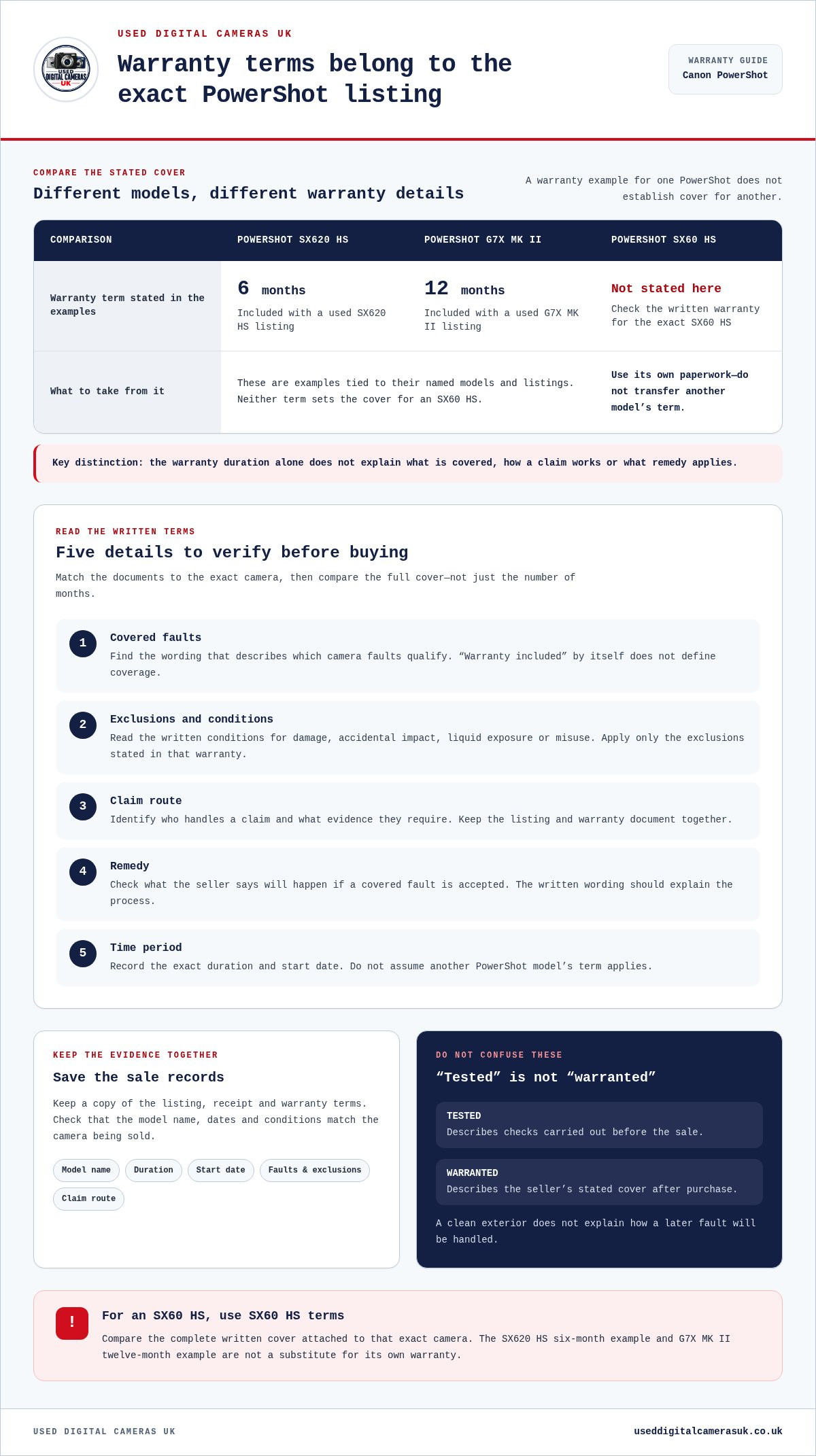
Warranty terms differ between second-hand Canon PowerShot listings. A used Canon PowerShot SX620 HS listing includes a six-month warranty. A used Canon G7X MK II listing includes a twelve-month warranty. These examples show why model names and warranty terms belong together. Neither term establishes coverage for the Canon PowerShot SX60 HS. Assess the SX60 HS using its own written warranty.
A warranty sets out the seller’s stated cover for faults under specific conditions. Read the terms before buying rather than relying on a short label in the listing. “Warranty included” alone does not explain which faults are covered, how to make a claim or what remedy applies. The written terms should identify the camera and explain the claims process.
Start by matching the paperwork to the exact model. Check that it names the Canon PowerShot SX60 HS, not another PowerShot. Then look for the warranty’s start point and end point. The SX620 HS’s six-month example and G7X MK II’s twelve-month example shouldn’t be transferred to an SX60 HS purchase.
- Covered faults: Find the wording describing which camera faults qualify. A general “warranty included” label doesn’t define coverage.
- Exclusions: Read any conditions for damage, accidental impact, liquid exposure, or misuse. Apply only the exclusions written in that warranty.
- Claim route: Identify who handles a claim and what evidence they require. Keep the listing and warranty document together.
- Remedy: Look for the stated outcome if a covered fault is accepted. The wording should explain the seller’s process.
- Time period: Record the exact duration and start date. Don’t assume another model’s term applies.
Save a copy of the listing, receipt and warranty terms. Those records help connect the sale to the camera and its stated cover. If the listing says “six months”, compare that phrase with the document’s dates and conditions. For an SX60 HS, use the specific paperwork supplied for that camera, not another model’s example.
Keep the warranty separate from the camera’s condition description. “Tested” and “warranted” mean different things: testing describes checks before sale, while warranty wording describes the seller’s stated cover after purchase. A clean exterior, for example, says nothing about how a later fault will be handled. Read both details before deciding.
Before paying, organise the details in one place: model name, warranty duration, start date, covered faults, exclusions and claim route. Compare those points across listings, rather than comparing durations alone. A longer term doesn’t explain its exclusions or remedy. For a second-hand Canon PowerShot SX60 HS, the useful comparison is the complete written cover attached to that exact camera.
What should I check before buying a used Canon PowerShot camera?
Start by confirming the exact model. A listing for a Canon PowerShot SX60 HS should use that name consistently in its title, description and photographs. Compare the controls and casing shown with the written details. For a second-hand Canon PowerShot in the UK, accurate identification helps you compare like with like and avoid relying on a mismatched advert.
Read the condition description carefully, separating cosmetic wear from faults that could affect use. A small scuff on the casing is different from a cracked screen or damaged lens. Look for close-up photographs of any marks and check that they show the actual camera. A general product image, for example, will not show wear on the specific item for sale.
- Lens: Look for scratches, cracks or visible dirt. Ask for a clear photograph of the lens surface if the listing image is unclear.
- Screen: Check for cracks, deep scratches or uneven display areas. A powered-on image can show whether the display is working.
- Controls: Look for intact buttons and dials. Ask whether the shutter, zoom and menu controls have been tested.
- Battery compartment: Check for visible damage, corrosion or a loose cover. Confirm which battery and charging items come with the camera.
- Included items: Compare the written list with the photographs. Note whether the accessories you need are part of the sale.
- History: Read any details about storage, previous faults or damage. Clear, specific explanations are more useful than a broad condition label.
- Sale terms: Read the return and warranty wording alongside the description. Keep a copy of the terms for the exact camera.
Ask focused questions before deciding. For example, ask whether the Canon PowerShot SX60 HS has been switched on and tested. If the seller says it “works”, ask which functions they tried. A useful reply might explain whether the camera powered on, took a photograph and operated its controls.
Match your inspection to how you plan to use the camera. If close-up photography matters, pay particular attention to lens images and sample photographs. For travel, check for visible casing wear and inspect the battery compartment. These practical checks help you judge whether the camera suits your plans.
Compare the model name, condition notes, test information, accessories and sale terms together. When comparing a second-hand Canon PowerShot in the UK, do not let one appealing photograph or a broad “good condition” label make the decision for you. A clear, consistent listing provides better evidence to guide your choice.
Listed prices offer a comparison point, but they do not show that two cameras are in similar condition or include the same accessories. Treat prices as examples, not a substitute for checking the precise model, condition, testing details and sale terms. Before buying, make sure the description and the seller’s answers address the checks that matter for your intended use.
How can I check a second-hand Canon PowerShot’s condition and functionality?
Test the Canon PowerShot in a consistent sequence instead of relying on its appearance. With the camera switched off, check the battery compartment, lens barrel and body seams for visible damage. Then switch it on and note any warning messages, unusual noises or delayed response. These checks can reveal issues a single product photograph cannot show.
Use the screen to inspect menus and playback. Press each control and confirm that the displayed setting changes. Move through the menu options, take a photograph and open it for review. Look for flickering, blank areas or lines across the display. A scratched screen may still work, but a display fault can make framing and reviewing images difficult.
Test the lens and focus on a bright, uncluttered scene. Aim at a nearby subject, then a distant one. Half-press the shutter and watch for focus confirmation, then take a photograph at each distance. If the camera has a zoom control, move through its range slowly and listen for grinding or repeated clicking. Check that the lens retracts when the camera is switched off.
- Shutter: Take several photographs. Listen for consistent operation and check that each image saves.
- Autofocus: Focus on a clear subject, then change distance. Review whether the resulting image looks focused.
- Flash: Use the camera’s flash setting in a dim scene. Check that it fires and that the photograph records.
- Zoom: Operate the zoom control in both directions. Watch for sticking, jerky movement or error messages.
- Playback: Open images on the camera. Check that the screen displays them without unexpected interruptions.
- Battery: Switch the camera on, use its controls and take test images. Watch for sudden power loss.
If possible, check image files on another device. A photograph may look fine on a small camera screen but reveal softness or marks when enlarged. Review the whole frame, including bright areas and plain backgrounds. Look for spots that persist across several photographs rather than assuming one unusual image proves a fault.
For an online purchase, ask for a short, continuous test video showing the Canon PowerShot powering on, using its zoom and taking a photograph. Request an image file from the same test. Matching evidence helps link the working demonstration to the camera in the listing.
Note any failed test alongside the camera’s condition description. For example, record whether autofocus struggled only in dim light or failed on a clear subject. Specific observations make it easier to judge the camera’s practical condition and decide whether its performance suits your needs.
What are the risks of buying a used Canon PowerShot from a private seller?
A private sale may provide less structured information than a retail listing. The seller might know the Canon PowerShot’s history, but the description depends on what they remember and choose to share. A camera that worked during a brief demonstration can still develop a fault later. Bear this uncertainty in mind when weighing convenience against risk.
The camera’s ownership and history can matter. Ask how the seller acquired it and why they are selling it. A clear, consistent account helps you understand its background. If the explanation changes between messages, pause before arranging payment. Check that the name in the messages matches the person completing the sale.
Condition descriptions can also mean different things to different sellers. “Good condition” might refer to the casing, not every function. A Canon PowerShot SX60 HS with visible wear could still operate properly, while an immaculate-looking camera could have an intermittent fault. Ask for specific details about known issues, previous damage and included accessories. Keep the answers in writing.
- Limited evidence: A few photographs don’t show the full camera history. Request current images of the actual item and its accessories.
- Unclear testing: “Works fine” doesn’t describe what the seller tested. Ask which functions they used and what happened.
- Missing items: The listing might not include everything you expect. Get a written inventory before agreeing to buy.
- Disagreement after handover: A fault found later can be difficult to compare with the camera’s earlier condition. Save the listing and messages.
- Payment pressure: Urgent requests or sudden changes to payment arrangements deserve caution. Don’t let a deadline replace sensible checks.
Meeting in person gives you a chance to inspect the camera, but it does not remove every risk. Test the functions you need and take time to review the seller’s description. If collection is not practical, ask for dated photographs or a continuous demonstration that clearly shows the camera in the listing.
Keep a record of the agreed model, condition, accessories and collection or delivery arrangements. For example, note that the sale includes the Canon PowerShot, battery and charger if those items were agreed. This gives you a clear reference if the package differs from the messages.
Consider how you would handle a problem after the sale. A private seller’s willingness to help depends on your agreement and communication. Do not treat a verbal assurance as a written warranty. Compare the available evidence and sale terms before sending money or collecting the camera.
How can I avoid scams when buying a used camera online in the UK
Check the listing’s details before discussing payment. A genuine Canon PowerShot SX60 HS listing should identify the model consistently throughout. Compare its title, description and photographs. Generic images, mismatched model names or copied descriptions make the camera harder to identify. Ask for a fresh photograph showing the camera beside a handwritten note with today’s date.
Assess the images as evidence, not decoration. Check that the same casing marks, lens and screen appear across photographs. A reverse image search can help reveal pictures reused from another listing. Ask for a short video showing the camera beside a distinctive object, then powering on. Its model and visible condition should match the advert.
Pay attention to how the seller communicates. Avoidable uncertainty arises when a seller dodges direct questions about the camera, changes explanations or insists on moving immediately to another messaging service. Keep the discussion on the selling platform where possible. Save the advert and messages, especially written claims about condition, accessories or delivery.
- Check the account: Read its profile and feedback history. Look for a consistent record rather than relying on one positive comment.
- Compare the advert: Check whether its description and photographs agree. A PowerShot model name should not change between messages.
- Keep payment traceable: Use a payment method with a clear record. Avoid unusual requests, such as paying someone else’s account.
- Question urgency: Be wary of claims that several buyers are waiting or payment must happen immediately. Pressure can prevent careful checks.
- Review delivery details: Get the delivery method and destination in writing. Keep any dispatch or tracking information with the listing.
- Save evidence: Store screenshots, messages and the final agreed details. These records can clarify what was advertised.
A price far below comparable Canon PowerShot listings calls for scrutiny, not an instant bargain claim. Check whether the advert explains the camera’s condition and included items. Vague wording, stock images and urgent payment demands alongside a low price are several warning signs to consider together.
Before paying, compare the seller’s account name with the payment details. Stop if the recipient changes unexpectedly or the seller requests an unrelated transfer. Do not share passwords, verification codes or banking sign-in details to buy a camera. A legitimate camera sale does not require those credentials.
For a Canon PowerShot SX60 HS, make a final written check of the model, included items, condition and delivery arrangement. Keep copies of the advert and agreement before completing payment. If the seller’s answers contradict the listing, or the requested payment method feels unfamiliar, walk away rather than letting urgency decide.
Used Digital Cameras UK: Used Sony Digital Cameras
Used Digital Cameras UK sells pre-owned Canon cameras alongside Sony, Nikon and Fujifilm models. If you are weighing a Canon PowerShot against another camera, compare the available collections to focus on the brand and style that suit your photography. Each device is tested and includes a battery, charger and memory card. UK shipping is free.
If you are considering a Canon PowerShot, compare the details on each individual listing, including condition and included items. Choose a used Canon camera if you want to stay with the brand, or explore another listed brand if you are considering alternatives.
Visit Used Digital Cameras UK to browse the used Canon digital cameras.
Choose the camera that fits your next project
Start by deciding what you want the camera to capture. Consider where you will use it, what you want to photograph and which features matter most. When comparing a second-hand Canon PowerShot in the UK, use those priorities to assess suitable listings rather than letting appearance alone guide your choice.
If you are considering a different make, Used Digital Cameras UK also sells used Sony, Nikon and Fujifilm digital cameras. Explore those options alongside the Canon range to find a camera that matches your preferences.
To discuss your next step, contact Used Digital Cameras UK. Take your time, choose with care, and enjoy finding a camera that inspires your photography.